
LilyGo T-Deck
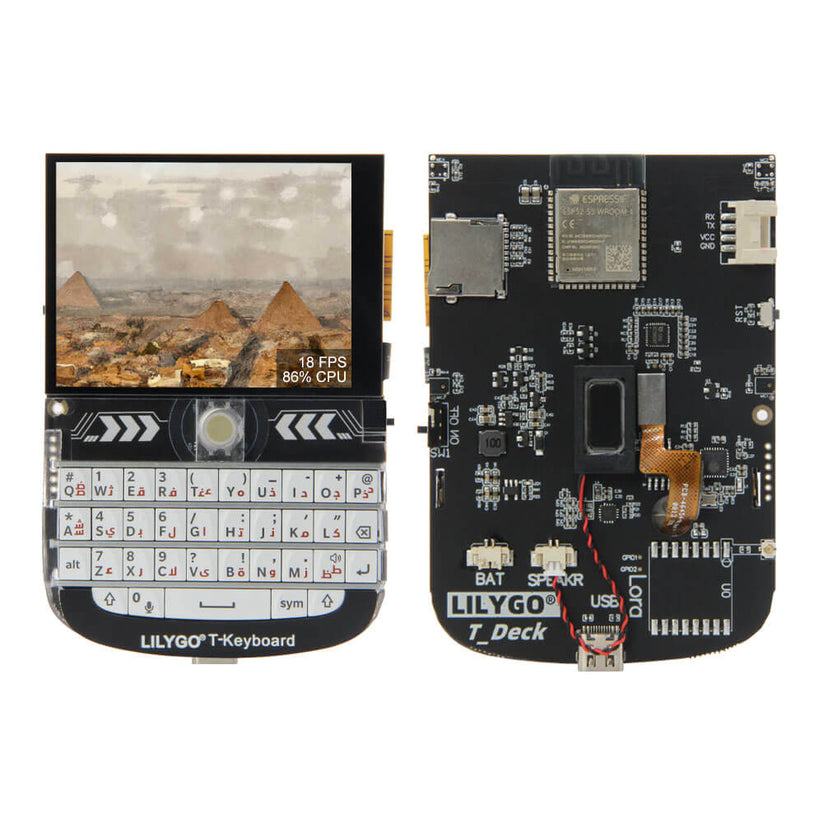
Compact handheld device with ESP32-S3, LoRa connectivity, integrated keyboard, and touchscreen display.
T-Deck
T-Deck Plus (with GPS)
Companion Radio Firmware
Repeater
Room Server
Main Processor
ESP32-S3 dual core
Secondary Processor
ESP32-C3 (keyboard management)
Screen
2.8 inch IPS LCD touchscreen (320×240)
Input
Integrated mini-keyboard + trackball
Audio
Integrated microphone and speaker
GPS
Available on T-Deck Plus variant
Battery
2000 mAh (T-Deck Plus)
Storage
SD card support up to 32GB
Key Features
Display
Bluetooth
WiFi
Keyboard
Trackball
Audio
GPS (Plus version only)
DFU Mode
SD Card
Device Variants
T-Deck
- Base model with all core functionality
- ESP32-S3 and ESP32-C3 processors
- 2.8" touchscreen, keyboard, and trackball
- No integrated GPS module
T-Deck Plus
- Enhanced model with additional features
- Integrated GPS module
- 2000 mAh battery capacity
- All features of the standard T-Deck
Detailed Specifications
| Parameter | Description |
|---|---|
| Processor | ESP32-S3 dual core |
| Secondary Processor | ESP32-C3 to manage the keyboard |
| Screen | 2.8 inch IPS LCD touchscreen with 320x240 pixels resolution |
| Keyboard | Integrated mini-keyboard |
| Trackball | Yes |
| Microphone and Speaker | Yes |
| GPS | Available on the T-Deck Plus variant |
| Battery | Integrated 2000 mAh (for T-Deck Plus) |
| SD Card Support | Support for cards up to 32GB |
DFU Mode Instructions
Entering DFU Mode (Device Firmware Update)
1
Turn off the device
2
Connect USB cable to device
3
Hold down trackball (keep holding)
4
Turn on device
5
Wait for USB connection sound
6
Release trackball
7
Device is now in DFU mode
Once in DFU mode, you can flash firmware using the MeshCore flasher tool.