
Server Administration
This section covers the configuration and management of repeaters and room servers in MeshCore.
Repeater and Room Server Configuration
How to configure a repeater or room server?
Initial Configuration Required
When MeshCore is first flashed onto a LoRa device, it is necessary to set the server device frequency so that it uses the legal frequency in your country or region.
Administration Methods
Web Configuration Interface
Access config.meshcore.dev to connect to the LoRa device via USB serial port and configure server name, frequency, location, passwords and other settings.
MeshCore Flasher Console
Connect the server device using a USB cable to a computer running Chrome. Access flasher.meshcore.co.uk and use the console function to connect to the device.
set freq {frequency}Remote Administration via Smartphone
Use a MeshCore smartphone client to administer servers remotely via LoRa communication.
Administration via Unlocked T-Deck
A T-Deck running unlocked/registered MeshCore firmware allows remote server administration. Registration supports MeshCore development.
Configuration Interface
Repeater / Room Server USB Setup
The web interfaces allow you to configure all essential parameters through intuitive graphical interfaces. The configuration tool provides real-time access to device settings and radio parameters.
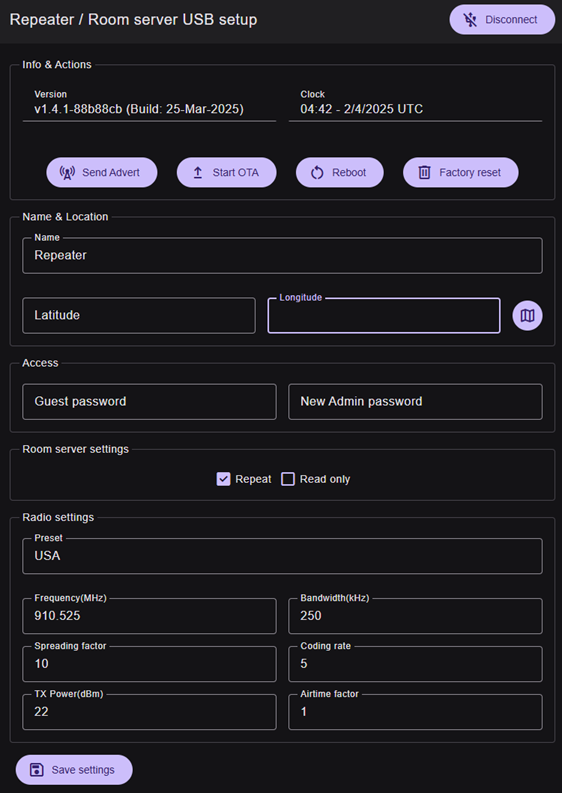
Configuration Parameters
Device Settings
- Device name
- Latitude and longitude
- Guest password
- New administrator password
Radio Settings
- Regional preset (e.g., USA)
- Frequency (MHz): e.g., 910.525
- Bandwidth (kHz): e.g., 250
- Spreading factor: e.g., 10
- TX Power (dBm): e.g., 22
- Coding rate: e.g., 5
- Airtime factor: e.g., 1
Room Server Specific Configuration
Room Server Settings
Available Parameters:
- Repeat: Enable repeater role
- Read only: Read-only mode
Advanced Administration
Remote Firmware Updates
For RAK4631 repeaters, remote firmware updates are possible. This feature allows maintaining devices up to date without physical access.
Location Management
Setting location for repeaters is not mandatory, but it can be useful for mapping and network organization.
Bluetooth Access
Repeaters can be accessed via BLE (Bluetooth Low Energy) for configuration and remote administration from compatible clients. Default pairing code: 123456
CLI Reference
Command Line Reference
For a complete CLI command reference for repeaters and room servers, visit:
Repeater & Room Server CLI Reference